Agent Testbed — publish an agent from a repo

Live
Designed and prototyped IBM's Agent Testbed: paste a repo URL, watch it build, hand it its secrets, and ship a shareable agent — no CLI.

Agent publishing, from CLI ritual to a paste-a-URL GUI

Agent Testbed — publish an agent from a repo hero

Overview

Role
Design Engineer
Period
2024 (concept → interactive prototype)

What I did

  • Owned the UX and UI for the full agent lifecycle — first run, add, build, configure, publish, update, and delete
  • Mapped every state the flow could land in — validating, building, configuration-needed, published, and the error paths between them
  • Built a working simulation of the interface so the interaction — streaming builds, secret injection, live chat — could be tried, not just reviewed

Try the live demo

Problem

Agents lived as repositories and container images that only their authors could run. Publishing one meant CLI incantations, secrets managed by hand, and no shared place to discover or try what already existed. The platform team wanted a GUI that made publishing an agent as simple as pasting a URL — but the honest realities couldn't be hidden: builds take time and sometimes fail, agents need secrets before they run, and versions change. The interface had to make those moments legible instead of scary.

What I designed & built

Designed Agent Testbed — a GUI where the whole lifecycle is one legible flow. You paste a repository URL; it validates, then builds in front of you; it asks for exactly the secrets it needs; it publishes; and then you can talk to it in the same window. Every waiting state is a status you can read, every failure is a state with a way out. I designed the states end-to-end and built a working simulation so the team could feel the interaction before a line of platform code changed.

Process

01

Paste a URL, not a config file

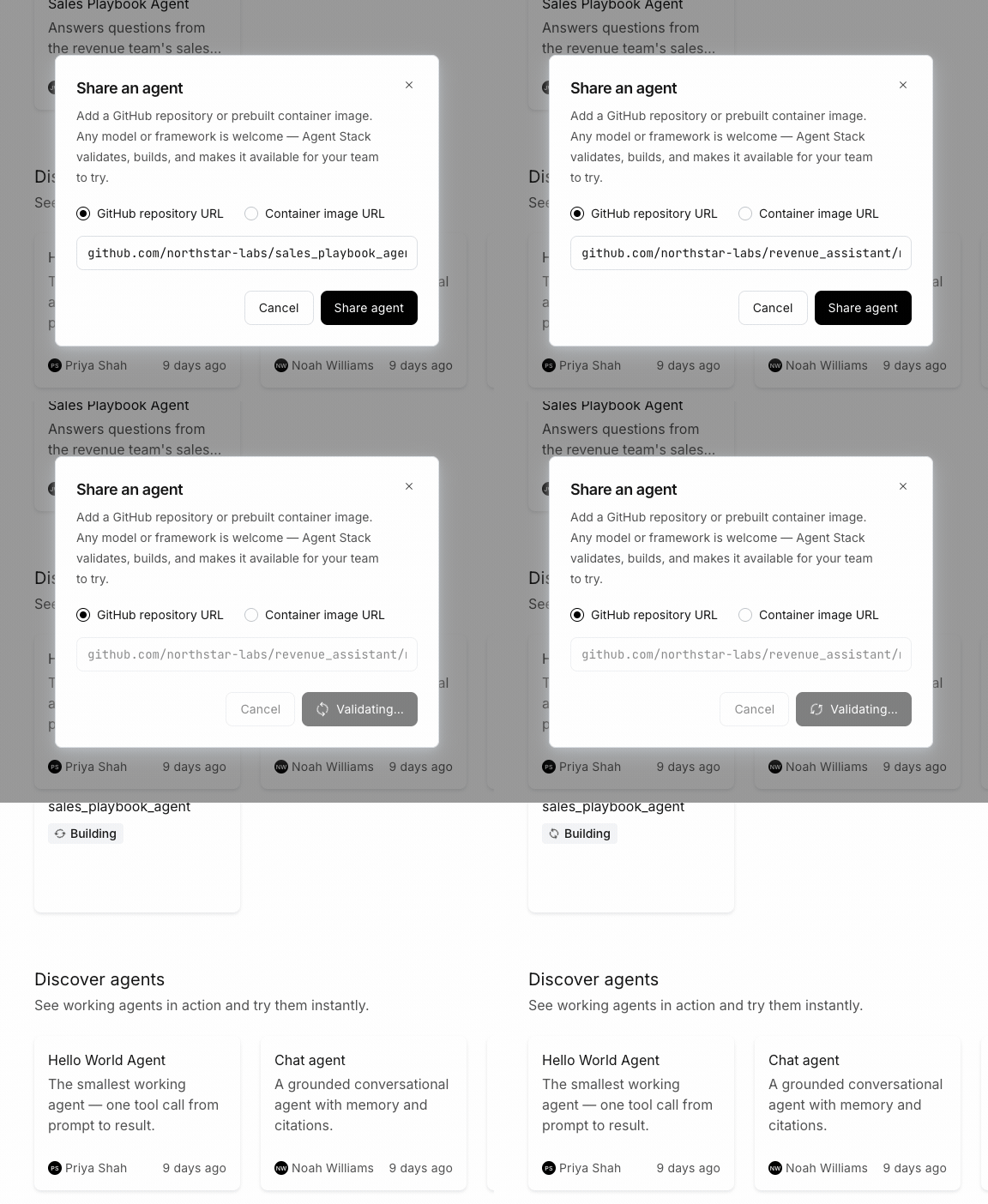
Publishing starts with one input

The entire onboarding is a repository URL (or a prebuilt container image). Paste it, press publish, and the system takes it from there — validating that the repo is reachable before it commits to a build.

Reachability is a first-class answer

A private or missing repo is the most common failure, so it's the first thing the flow checks and the clearest thing it reports — a plain message with a next step, not a stack trace. The bet: if adding an agent feels like sharing a link, people will actually share them.

One field to publish

Choose repo or image, paste the URL, and the system validates before building — reachability is checked up front, where a fix is cheapest.

Problem definition

How do you make publishing an agent feel approachable when the underlying operation is a build-and-deploy pipeline?

Key insights
  • The smallest possible input — a URL — sets the expectation that this is easy, and the system earns that expectation by doing the rest
  • Validating reachability before building means the most common failure surfaces in seconds, not after a two-minute build
Alternatives considered
  • A multi-field form capturing runtime, entrypoint, and env up front
  • A CLI-first flow with the GUI as a read-only dashboard
Design rationale

One input, then progressive disclosure: ask for only what's needed, only once the system knows it's needed.

02

The build is the status

A streaming log instead of a spinner

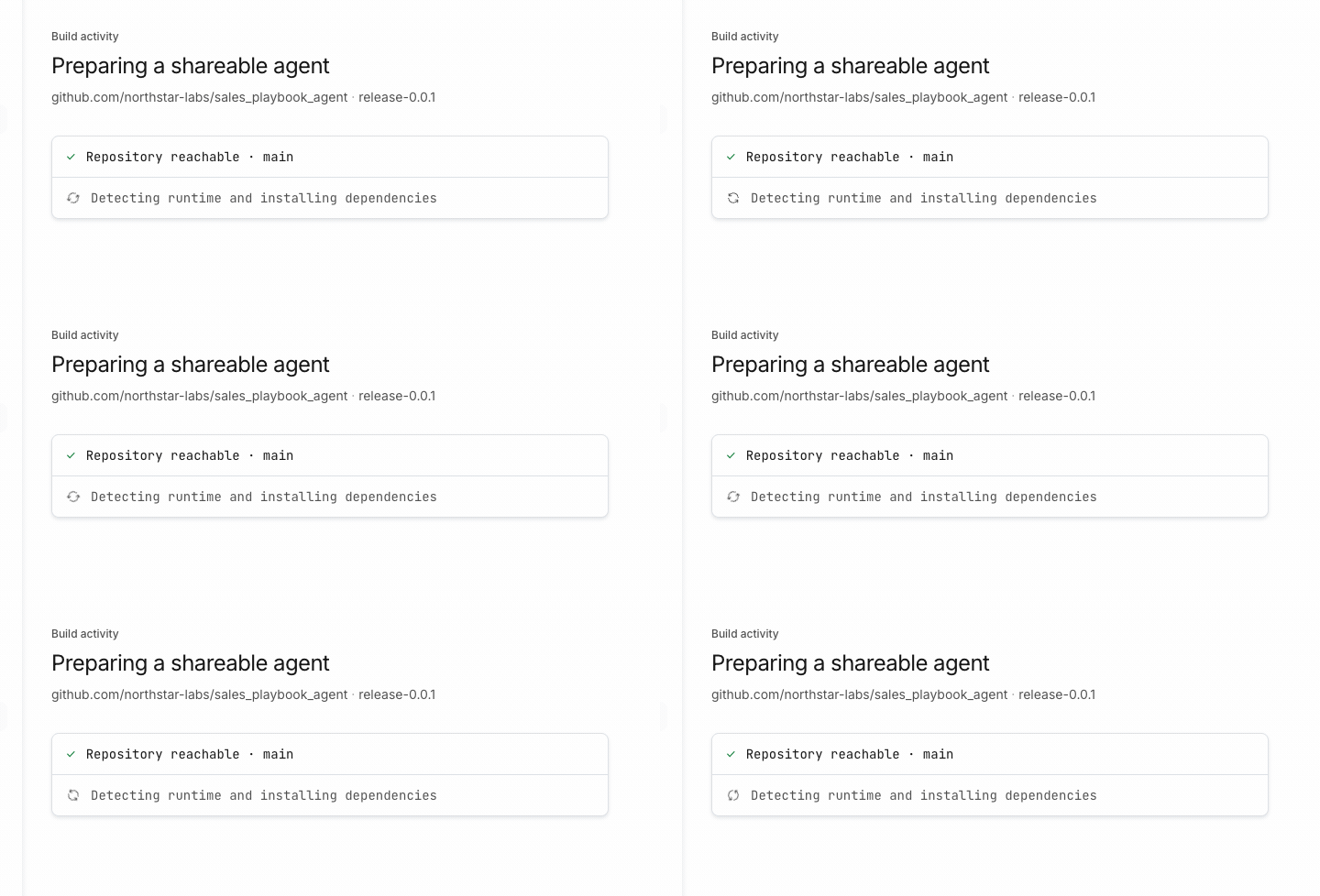
Once the repo validates, the build streams its work — resolving, installing, building the image, starting the container — one line at a time. Real steps scrolling by communicate deliberate progress far better than a percentage bar that's really a guess.

It ends by telling you what it needs

The build doesn't silently succeed or fail. It resolves into a specific next state — here, configuration needed — so the waiting always has a destination.

Progress you can read

The build log scrolls its real steps and lands on a named state — configuration needed — so a two-minute wait never feels like a dead end.

Problem definition

How does a slow, opaque build stay trustworthy while the user waits?

Key insights
  • Streaming concrete steps reads as competence; an indeterminate spinner reads as maybe-broken
  • Every wait should resolve into a named state with an action, never a silent success or a raw error
Alternatives considered
  • A progress bar over an estimated build time
  • A collapsed 'building…' chip with logs hidden behind a click
Design rationale

Show the work. The log is both the progress indicator and the audit trail if something goes wrong.

03

Secrets are a step, not a surprise

The agent asks for exactly what it needs

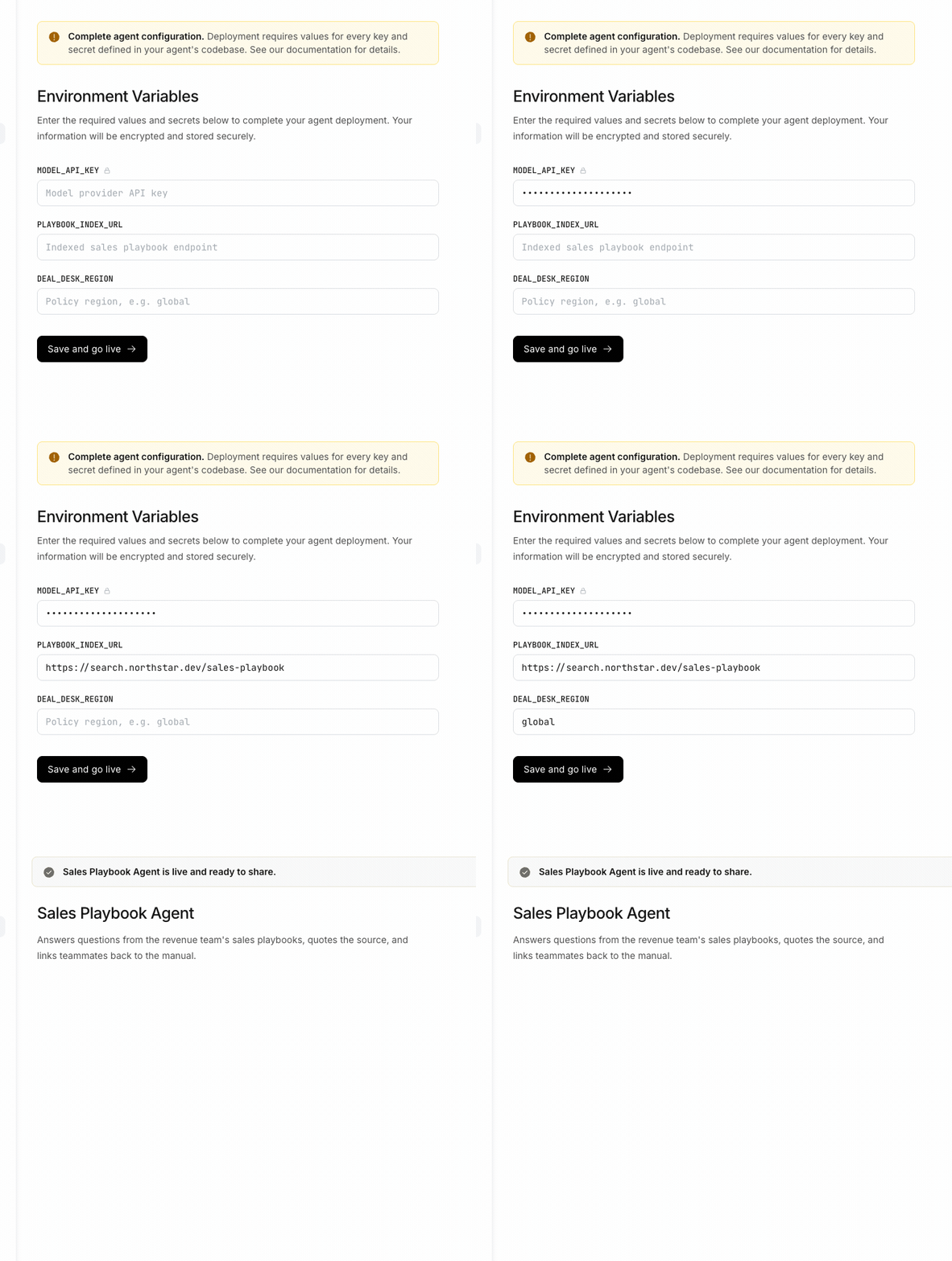
Many agents can't run without API keys or endpoints. Rather than fail at runtime, the build pauses at a configuration-needed state and presents the precise set of secrets required — labeled, marked when sensitive, and encrypted on save.

Saving is publishing

Filling the secrets and saving is the same action that injects them, re-runs the health check, and flips the agent to live — the configuration step and the publish step are one motion.

Only the secrets it needs

Configuration is a named state, not an error — the agent lists exactly the keys it requires, and save doubles as publish.

Problem definition

Where do required secrets belong in a flow that's trying to feel effortless?

Key insights
  • Asking for secrets at the moment they're needed — after a successful build — is far clearer than a giant form up front
  • Collapsing 'save secrets' and 'publish' into one action removes a step people would otherwise forget
Alternatives considered
  • Collect all env vars in the initial add-agent modal
  • Publish first, then nag with a separate 'configure' task
Design rationale

Just-in-time configuration: the agent declares its needs, the user answers them once, and the same click ships it.

04

Published means usable

The window you built it in is the window you use it in

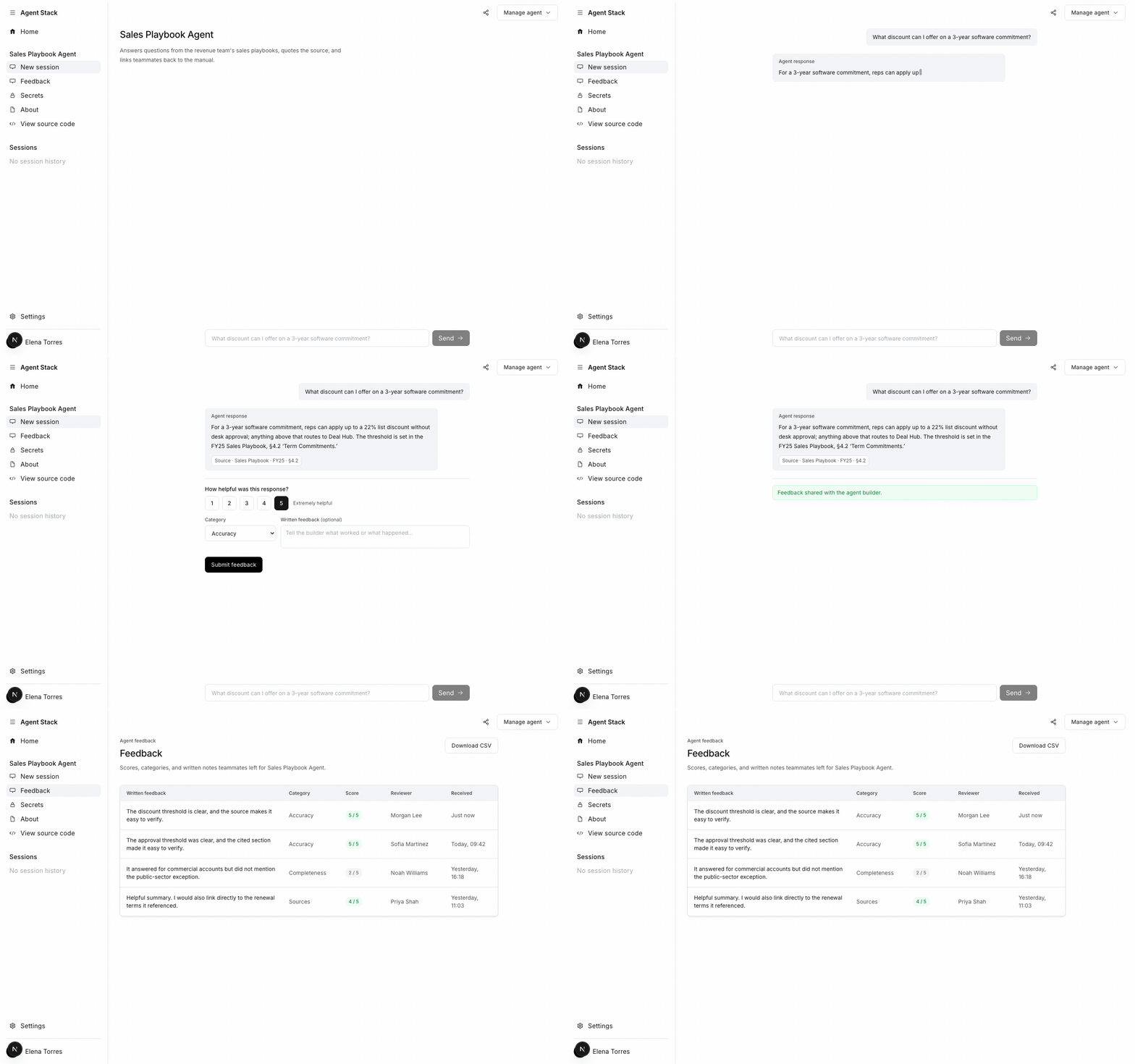
When an agent goes live, the same surface becomes a place to talk to it — no context switch, no separate console. Ask a question and the answer streams back with its source cited, so the agent's output reads as evidence, not assertion.

Manage it in place

Environment variables, source code, and removal all live behind one Manage agent control — the lifecycle doesn't end at publish, so neither does the interface.

Talk to what you shipped

Publishing turns the build surface into a chat surface — replies stream with citations, and Manage agent keeps secrets, source, and teardown one click away.

Problem definition

What should 'published' actually feel like — a confirmation, or a capability?

Key insights
  • An agent you can immediately talk to proves it works far better than a green success toast
  • Keeping manage actions in the same surface signals the agent is owned and maintainable, not fire-and-forget
Alternatives considered
  • Publish to a list and open the agent in a separate runtime
  • A success screen with a link out to a hosted endpoint
Design rationale

Close the loop in one place: the surface that built the agent is where you try it, share it, and maintain it.

Learnings

  • Making waiting legible — streaming real steps and resolving every wait into a named, actionable state — does more for trust than any amount of visual polish.
  • Just-in-time configuration beats up-front forms: let the system discover what it needs and ask for it once, at the moment it's needed.
  • Building a working simulation of the flow surfaced interaction problems — pacing, state transitions, error copy — that static mockups hid entirely.
  • Collapsing adjacent steps (save secrets = publish, build surface = chat surface) removes whole categories of user error.

Next steps

  • Design the multi-version story: updating an agent in place while keeping a rollback path.
  • Extend the discover experience — search, components, and shared sessions across a team.
  • Pressure-test the error states with real build failures and partial-secret recovery.