Live product · read-only calendar connections · data stays in the browser
Overview
- Role
- Product Designer & Developer
- Period
- 2026
- Platform
- Responsive web
- Tools
- React · TypeScript · Vite · Luxon · Vercel
What I did
- Framed the product around a recurring remote-work need: coordinating clearly across cities, dates, and working hours
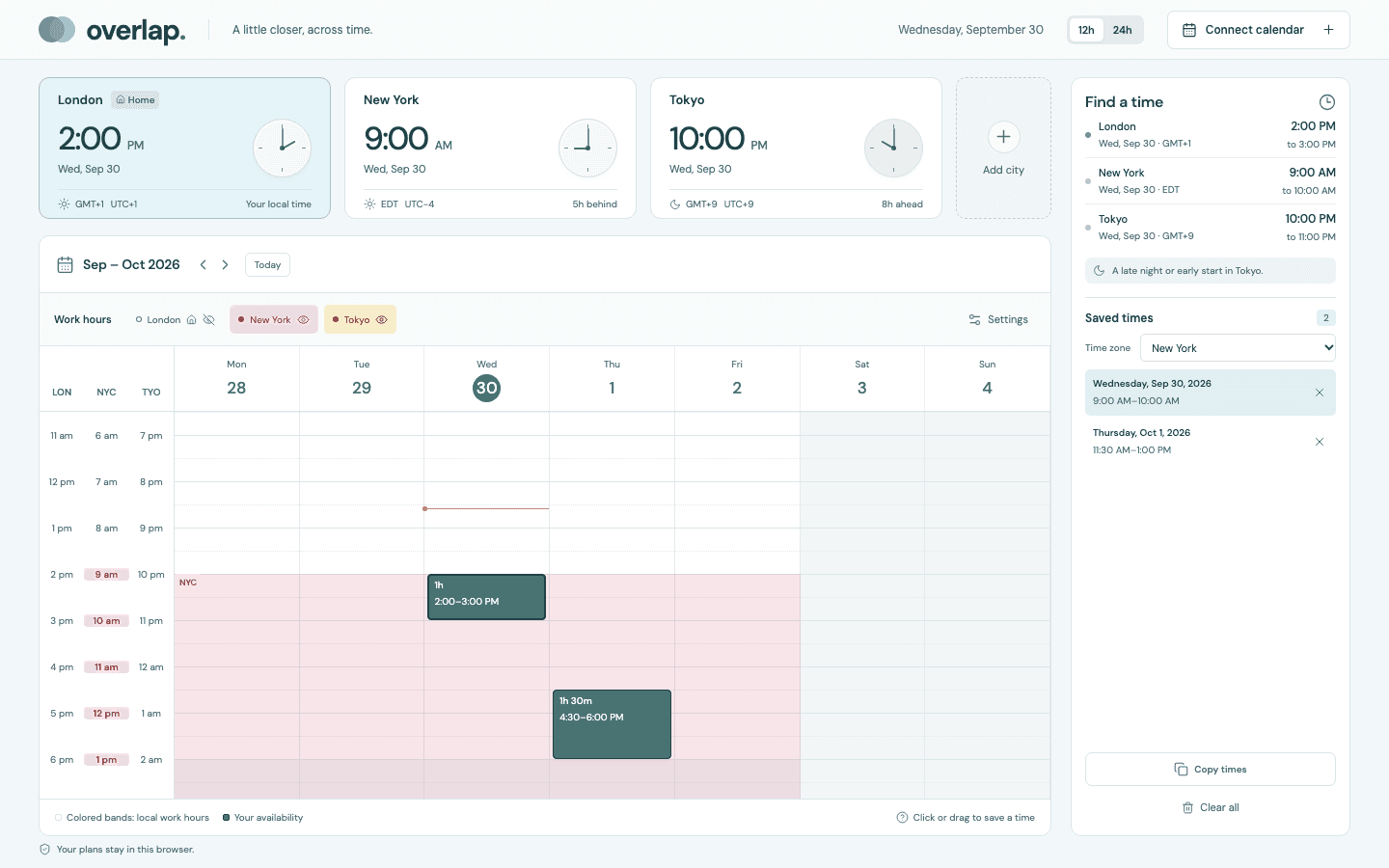
- Designed a single-screen workflow combining city clocks, working-hour bands, a weekly calendar, and saved availability
- Built date-aware time-zone conversion with explicit daylight-saving handling
- Added read-only calendar imports and copy-ready availability while keeping plans in the visitor's browser
- Implemented and tested the responsive React and TypeScript application, then deployed it publicly
Problem
Remote collaboration across time zones often means repeatedly converting dates, checking daylight-saving differences, comparing working hours, and rewriting the same availability message. A correct time is not enough—the day change and the context around that time also have to be obvious.
Users
Remote workers coordinating across cities
People arranging meetings, interviews, reviews, or working sessions with collaborators in other time zones.
- Needs to see the same moment in every relevant city
- Wants to compare working hours before offering a time
- Needs availability that can be copied directly into a message
Problem statement
Make the date, local context, and working-hour overlap as easy to read as the clock time—then turn the result into something ready to send.
What I designed & built
Overlap brings city clocks, date-aware time conversion, working-hour comparison, calendar context, and saved availability into one focused screen. People can click or drag to save a range, view it in another city's time zone, and copy a polished message. Calendar connections are read-only, and settings, imports, and saved times remain in local browser storage.
Product flow
From a possible time to a message ready to send
The interaction keeps comparison and decision-making in one place while preserving the actual instant behind every local time.
Add cities
Choose a home city and the places you need to compare.
Read the overlap
See local dates, offsets, and configurable working-hour bands.
Save availability
Click or drag on the calendar in half-hour increments.
Copy and send
Generate a grouped availability message in the chosen city time.
↳ Calendar context
Import an ICS file or connect a read-only iCloud or Google feed.
↳ DST edge cases
Reject missing times and expose explicit offsets for repeated times.
↳ Local-first storage
Keep cities, preferences, calendars, and saved times in the browser.
Process
Start with the lived friction
The product began with a concrete remote-work problem: offering times across cities without making a date or daylight-saving mistake. That narrowed the brief to the information needed for a confident decision rather than a general-purpose calendar.
World clocks show conversions, and calendars show events, but neither turns a cross-city comparison into availability ready to share.
- Date changes need equal visual weight to clock times
- Working hours are useful only when people can compare them together
- The final output is a message, not another calendar object
A single-screen planner keeps the clocks, calendar, and message connected so people do not have to rebuild context between tools.
Design for time-zone truth
Every saved range represents an actual instant, not a loose wall-clock label. Switching the calendar's city changes the display without changing the underlying time, and daylight-saving behavior is calculated for the selected date.
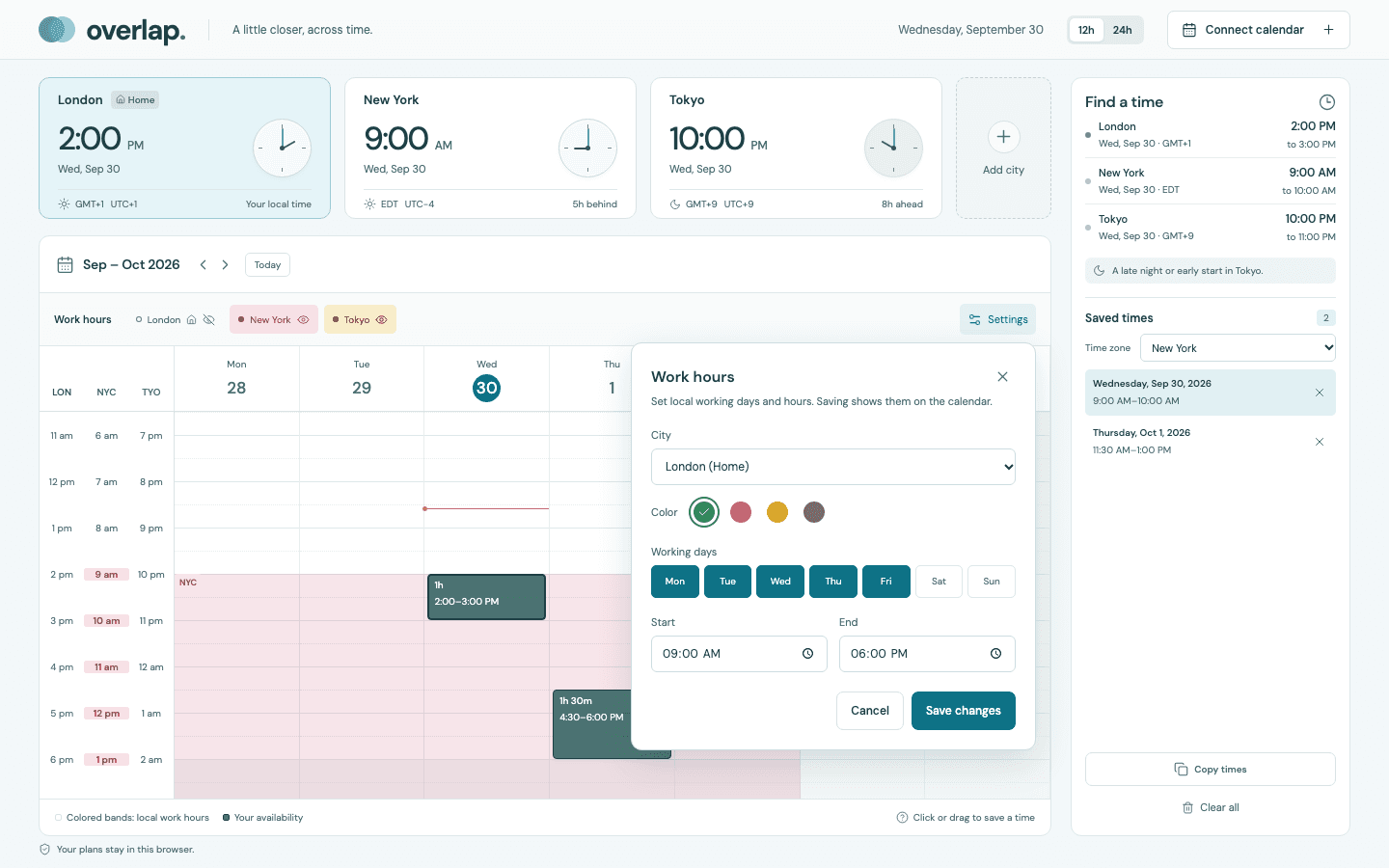
Working hours are personal
Each city can have its own days, hours, and color. The resulting bands make shared working time visible without assuming everyone keeps the same schedule.
Key decisions
Show the local date beside every city time
A day change is one of the easiest details to miss when collaborators are far apart.
People can verify both the hour and the calendar day before offering a slot.
Separate calendar view from copy time zone
Someone may want to inspect the week in home time but send availability in the recipient's local time.
The display can change without forcing the outgoing message to use the same city.
Keep calendar access read-only
Availability planning should not need permission to modify a person's calendar.
Imported events provide context while the product stays lightweight and lower-risk.
Build privacy into the product boundary
Overlap has no account, database, analytics, or external font request. Cities, preferences, imported calendars, and saved slots stay in browser storage. Calendar feed links use a constrained server endpoint for read-only fetching without app-side persistence.
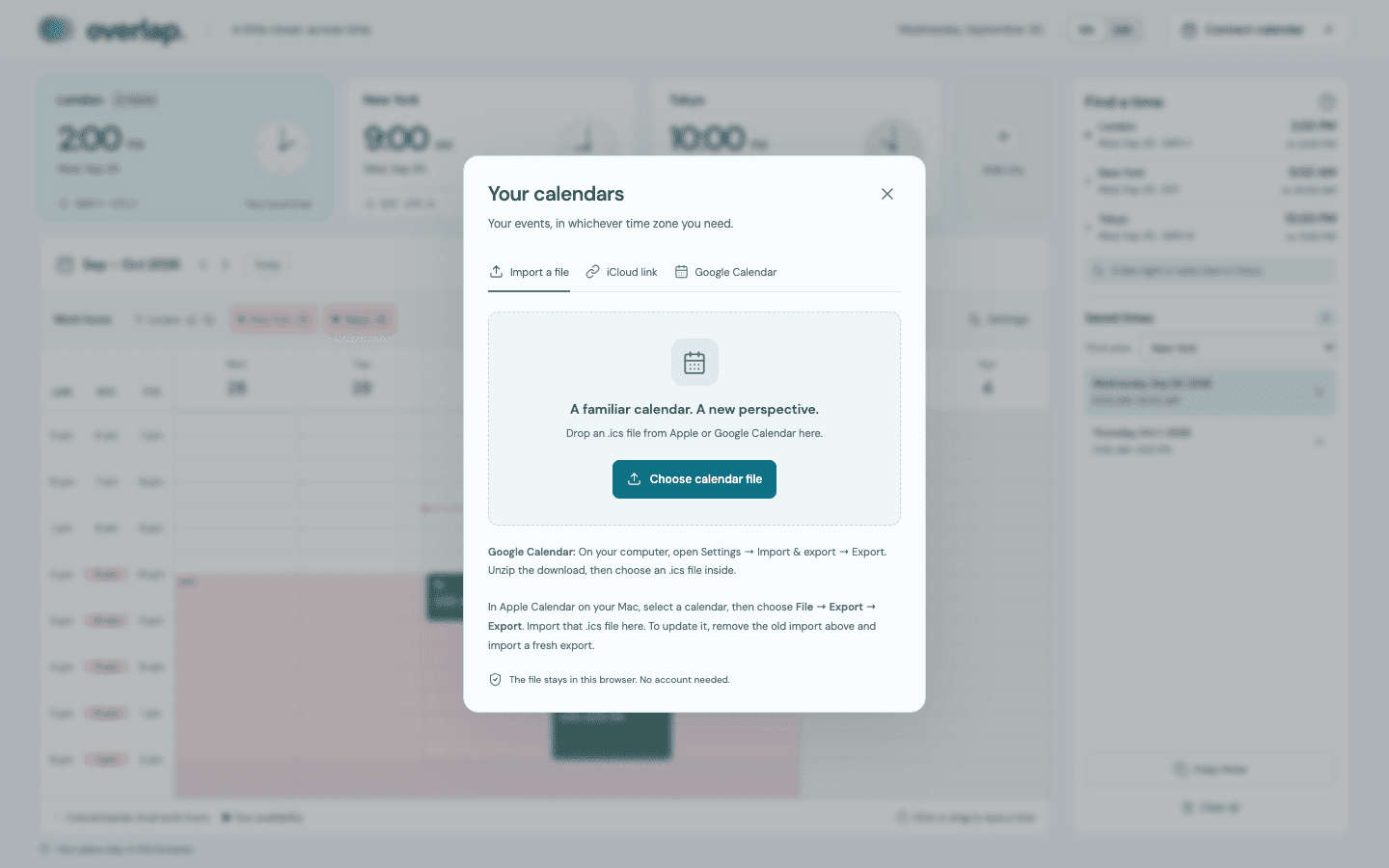
Context without calendar control
People can import an ICS file or connect a read-only feed. The interface states where calendar data goes and avoids asking for write access.
Shipped outcome
Shipped as a public, no-sign-in web app that turns a common remote-work scheduling workaround into a reusable product. The deployed experience supports multi-city planning, configurable work hours, read-only calendar context, and copy-ready availability without storing a visitor's plans on an app server.
Learnings
- Time-zone UX is as much about dates and context as it is about conversion accuracy
- Local-first constraints can simplify onboarding while making the privacy model easier to explain
- A focused workflow can bridge several utilities without becoming a general-purpose calendar